
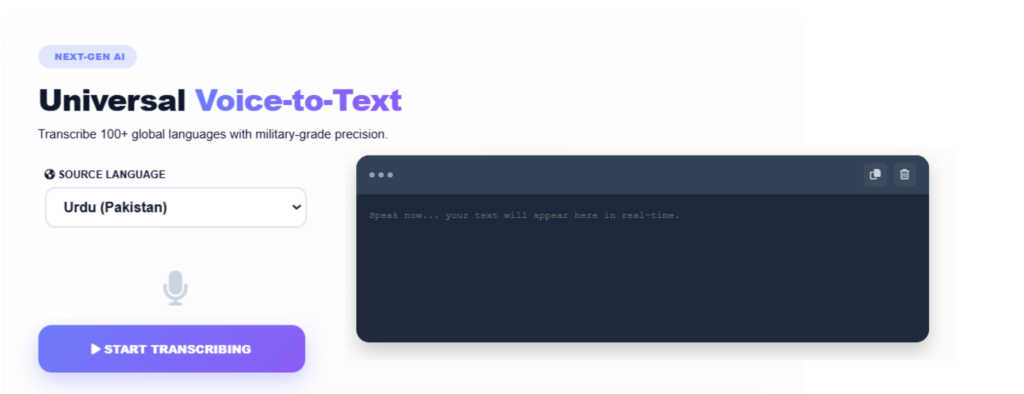
The Ultimate Guide to Voice-to-Text Technology
In today’s fast-paced digital world, efficiency is the key to success. Whether you’re a student racing to complete a thesis, a content creator preparing the next viral blog post, a journalist transcribing interviews, or a professional handling daily corporate documentation, time is your most valuable resource. Manually typing thousands of words is not only time-consuming but can also lead to fatigue, reduced productivity, and creative burnout. This is where Voice-to-Text technology, also known as Automated Speech Recognition (ASR), becomes a powerful game-changing solution.
At EveryToolfy, our online Voice-to-Text tool is designed to seamlessly transform spoken language into written text with speed and precision. Powered by advanced language processing and speech recognition technology, this free tool enables users to convert audio and video speech into highly accurate text effortlessly. Whether you need quick transcriptions for meetings, captions for videos, academic notes, or content creation, our tool helps you save time and boost productivity.
In this comprehensive guide, we’ll explore how Voice-to-Text technology works, its key benefits across multiple industries, and practical tips to improve transcription accuracy for the best possible results.
What is Voice-to-Text Technology and How Does It Work?
Voice-to-text technology is an advanced software solution that converts spoken language into accurate written text. Although the process appears fast and effortless on the screen, it relies on powerful AI-driven algorithms and complex computational workflows working behind the scenes.
- Acoustic Analysis; When you speak into your microphone using EveryToolfy’s interface, the system captures your voice and analyzes the sound waves in real time. The continuous audio stream is then divided into small recognizable sound units called phonemes — the building blocks of spoken words.
- Intelligent Language Modeling; Next, advanced statistical and deep-learning language models process these phonemes within their context. The system compares the detected sounds against an extensive database of vocabulary, grammar patterns, and contextual phrases to accurately predict the words being spoken.
- Instant Text Generation; Finally, the recognized words are organized into clear, coherent sentences. The software automatically applies spacing, capitalization, and basic punctuation, delivering readable text inside the editor within seconds.
At EveryToolfy, our AI-powered voice-to-text technology is designed to provide fast, accurate, and user-friendly speech recognition for improved productivity and seamless communication.
Why Thousands of Users Trust EveryToolfy Every Day
At EveryToolfy, our tool is built with a user-focused approach to remove the limitations of traditional manual typing. Here’s why thousands of users choose EveryToolfy for fast, accurate, and hassle-free voice-to-text conversion:
100% Free and Easily Accessible
Enjoy enterprise-level transcription services completely free of cost. There are no hidden charges, premium subscriptions, or daily usage limits, making it accessible for everyone.
No Installation Required
EveryToolfy is a fully web-based platform that works directly in your browser. There’s no need to download bulky software or mobile apps that consume your device storage and slow down performance.
Real-Time, Lightning-Fast Processing
Convert speech into text instantly with real-time transcription technology. As you speak, your words appear on the screen immediately, saving valuable time compared to manually typing or transcribing audio recordings.
Privacy and Security You Can Trust
Your privacy is our top priority. EveryToolfy securely processes your voice recordings and generated text without permanently storing your data on servers, ensuring a safe and confidential experience.
Key Benefits of Speech-to-Text Across Various Fields
1. Boosting Content Creation & Blogging
Writer’s block often happens because your mind generates ideas much faster than you can type them. By speaking naturally, bloggers and copywriters can maintain a smooth and organic flow of thoughts without interruption. Dictating your content also helps create a more conversational tone, making articles more engaging for readers while aligning perfectly with modern SEO practices and search engine algorithms.
2. Revolutionizing Education and Academic Research
Students and educators manage a constant flow of verbal communication every day. With voice-to-text technology, students can quickly dictate lengthy essays, organize research notes, and accurately transcribe recorded lectures. Researchers conducting qualitative interviews can also benefit from automated transcription tools, significantly reducing the documentation process from days to just a few minutes. This technology improves productivity, saves valuable time, and enhances overall academic efficiency.
3. Enhancing Business Productivity and Meeting Minutes
In corporate environments, clear documentation is essential for effective communication and productivity. Instead of relying on a team member to manually take notes during meetings, speech recognition tools make it easy to capture brainstorming sessions, client requirements, and action items accurately and efficiently. These tools also help professionals dictate emails, reports, and documents while multitasking, saving valuable time and improving workflow efficiency.
4. Providing Accessibility for Everyone
Digital inclusivity plays a vital role in creating accessible technology for everyone. Voice-to-text technology serves as a powerful assistive solution for individuals with physical disabilities, repetitive strain injuries such as carpal tunnel syndrome, and learning differences like dyslexia. By enabling users to communicate and interact with digital devices using only their voice, it enhances accessibility, improves productivity, and promotes a more inclusive digital experience for all users.
Step-by-Step Guide: How to Use EveryToolfy Voice to Text
Getting started with our online speech recognition system is quick, simple, and user-friendly:
- Prepare Your Equipment; Make sure your device has a working microphone. For the best voice recognition accuracy, we recommend using a high-quality USB microphone or an external headset.
- Allow Browser Permissions; Open our Voice-to-Text tool and grant microphone access when your browser prompts you. This secure permission allows the tool to capture your speech in real time.
- Start Speaking; Click the “Start” or microphone button and begin speaking clearly at a natural pace. Your spoken words will instantly be converted into accurate text within the editor.
- Edit and Export Your Text; After finishing, click the stop button to end the recording. Review the transcribed text, make any necessary edits, and easily copy or download your content with a single click.
Our advanced speech recognition technology is designed to deliver fast, accurate, and seamless voice-to-text conversion for everyday use.
Pro-Tips for Getting Maximum Transcription Accuracy
While our automated speech-to-text algorithms are highly advanced, transcription accuracy largely depends on the quality of your audio input. Follow these expert tips to achieve clear, accurate, and professional transcriptions every time.
Minimize Background Noise
Record in a quiet environment whenever possible. Avoid loud fans, air conditioners, background music, traffic noise, or nearby conversations, as unwanted sounds can interfere with speech recognition accuracy.
Speak Clearly and Naturally
You don’t need to sound robotic, but speaking clearly and pronouncing words properly can significantly improve transcription results. Avoid excessive mumbling or speaking too quickly.
Maintain a Consistent Microphone Distance
Keep your microphone at a steady distance from your mouth — ideally between 2 to 4 inches. This helps prevent sudden volume changes, audio distortion, and clipping issues.
Say Punctuation Out Loud
For cleaner, publication-ready text, verbally include punctuation while speaking. For example, saying “Hello world comma welcome to my website period” will appear as “Hello world, welcome to my website.
Yes, your privacy is fully protected. Our tool processes audio streams only temporarily for translation purposes. We do not store, record, listen to, or share your audio recordings or transcribed text with any third parties.
Yes, our speech recognition system is trained on large, diverse global datasets. This enables it to accurately understand a wide range of accents, dialects, regional speech patterns, and colloquial expressions with high accuracy.
Can I transcribe long pre-recorded audio or video files?
Yes, in addition to real-time voice dictation, our toolkit supports multiple video and audio formats. Simply upload your media file, and our advanced processing engine will generate clean, timestamp-optimized text transcriptions effortlessly.
Our tool uses a sophisticated algorithm based on the DIME method to deliver accurate, reliable, and precise financial calculations. Also explore our MP3 Converter and Voice to Text for more useful online tools.