A personal finance app is the fastest way to see where your money goes, stop overspending and start saving without spreadsheets. The problem is choice. There are dozens of apps, and each one promises to fix your money habits. Most people download one, quit after two weeks and go back to guessing.
This guide fixes that. We compared nine popular options by price, features, platform support, privacy and how easy they are to stick with. We also explain how these apps work, how to keep your data safe, and how to set one up properly in about 30 minutes.
Prices and features change often, so always confirm the latest details on each official website before you pay.
Quick Answer: The Best Personal Finance App for Most People
If you want the short version, here it is.
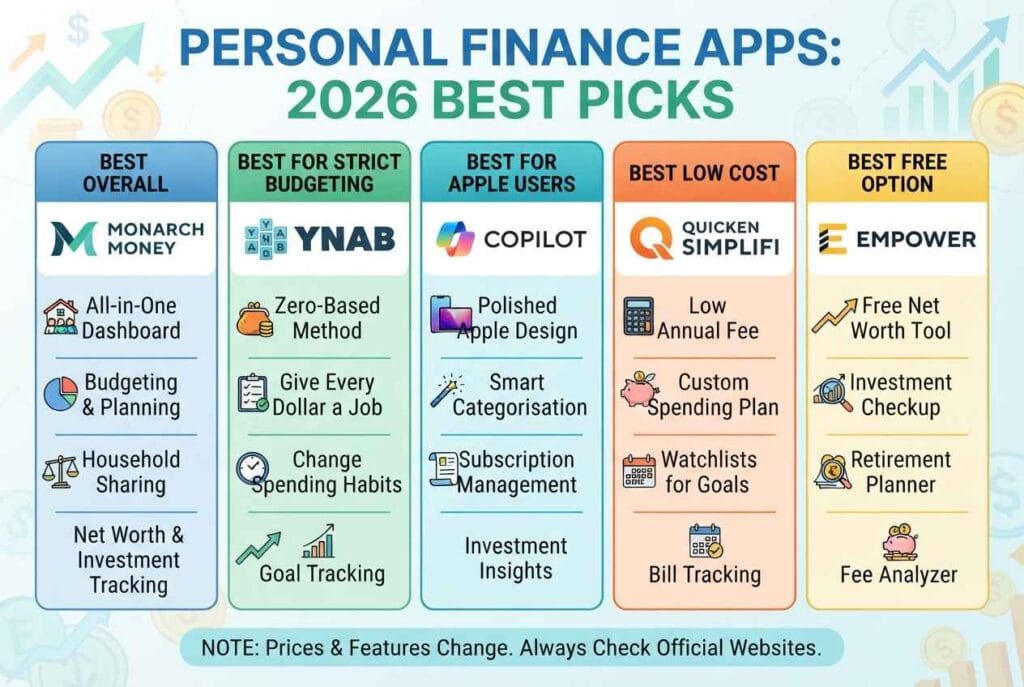
- Best overall: Monarch Money. It offers budgeting, net worth, investments and household sharing in one place.
- Best for strict budgeting: YNAB (You Need a Budget). It teaches you to give every dollar a job.
- Best for Apple users: Copilot Money. It has a polished design and smart categorisation.
- Best low-cost option: Quicken Simplifi. It costs roughly half of Monarch or YNAB.
- Best free option: Empower Personal Dashboard. It is great for net worth and investment tracking.
The right personal finance app is the one you will open every week. A cheaper tool you use beats an expensive one you ignore.
What Is a Personal Finance App?
A personal finance app is a mobile or web tool that helps you track income, spending, bills, savings, debt and investments in one place. Most apps connect to your bank accounts and pull in transactions automatically. Others let you enter data by hand.
In simple terms, it replaces the old notebook or spreadsheet. It does the sorting and adding for you, then shows the results in charts and simple reports.
Most apps in this category offer some mix of these features:
- Automatic transaction import and categorisation
- Monthly budgets and spending limits
- Bill and subscription tracking
- Savings goals
- Net worth tracking (assets minus debts)
- Investment and retirement tracking
- Reports, alerts and reminders
Some people use the terms “budgeting app,” “money management app” and “expense tracker” for the same thing. There are small differences. An expense tracker only records spending. A budgeting app adds limits and plans. A full personal finance app usually covers both, plus net worth and goals.
How a Personal Finance App Works
Understanding the basics helps you judge which app is safe and useful. Here is the usual process.
1. You create an account. You sign up with an email and password. Good apps also offer two-factor authentication.
2. You link your accounts. Most apps use a secure connection service. In the US, Plaid is a very common provider. In the UK and Europe, apps rely on Open Banking, which is regulated. You log in through your bank, not through the app, and the connection is normally read-only.
3. The app imports transactions. New purchases appear automatically, usually within a day. The app tags each one, such as groceries, fuel or rent.
4. You review and adjust. Auto-categorisation is never perfect. You fix mistakes, and better apps learn from your corrections.
5. You see the big picture. Dashboards show where money went, how much is left, and how you are progressing towards goals.
Apps that do not use bank connections work differently. You type in each expense yourself. It takes more effort, but some people prefer it for privacy or because it builds awareness.
Why Use a Personal Finance App in 2026?
Money is more complicated than it used to be. Most people now juggle several bank accounts, credit cards, subscriptions and buy-now-pay-later payments. Prices have risen, and small leaks add up quickly.
A personal finance app helps in four practical ways.
You see your real numbers. Many people guess their spending and guess low. Seeing an actual category total is often a shock.
You catch forgotten subscriptions. Streaming, apps, gym memberships and trials that never got cancelled quietly drain money each month.
You plan instead of react. With a budget in place, you know if you can afford a purchase before you make it.
You build the saving habit. Goals with a visible progress bar are far more motivating than a vague wish to “save more.”
Research from the Federal Reserve on household well-being regularly shows that many households struggle to cover a surprise expense. You can read the latest findings in the Federal Reserve’s Economic Well-Being of U.S. Households report. Tracking your money will not fix everything, but it is the first step to building a buffer.
Comparison Table: 9 Best Personal Finance Apps in 2026
Prices below are approximate and based on publicly listed 2026 pricing. They can change, so check each website.
| App | Best For | Approx. Price | Platforms | Bank Sync |
|---|---|---|---|---|
| Monarch Money | All-in-one dashboard, couples | About $99.99/year or $14.99/month | iOS, Android, Web | Yes |
| YNAB | Zero-based budgeting | About $109/year or $14.99/month | iOS, Android, Web | Yes |
| Copilot Money | Apple users, design | About $95/year or $13/month | iOS, Mac, iPad | Yes |
| Quicken Simplifi | Low cost | About $48 to $72/year | iOS, Android, Web | Yes |
| Empower Personal Dashboard | Free net worth tracking | Free | iOS, Android, Web | Yes |
| Rocket Money | Subscription cancelling | Free tier, paid premium | iOS, Android, Web | Yes |
| PocketGuard | “What is left to spend” view | Free tier, paid plus | iOS, Android, Web | Yes |
| Goodbudget | Envelope budgeting | Free plan, paid upgrade | iOS, Android, Web | Manual/limited |
| Actual Budget | Privacy, open source | Free (self-hosted) | Web, Desktop | Optional |
The 9 Best Personal Finance Apps Reviewed
1. Monarch Money: Best Overall Personal Finance App
Monarch Money was founded by a former Mint product manager, and it shows. The app feels like a modern take on what Mint used to offer. It connects bank accounts, credit cards, loans and investments, and shows everything in one clean dashboard.
Budgeting is flexible. You can choose category budgets or a flex approach. The app also includes a net worth tracker, recurring bill reminders, custom reports and goal tracking. Couples can share access, which is a big win for households.
Pros
- Excellent all-in-one dashboard
- Household sharing for partners
- Strong reports and customisation
- Works on iOS, Android and web
Cons
- No permanent free plan
- Short free trial compared with some rivals
- Setup takes longer than simpler apps
Verdict: Choose Monarch if you want one app for budgeting, net worth and investments. You can see the current plans on the official Monarch Money website.
2. YNAB (You Need a Budget): Best for Strict Budgeting
YNAB is not just an app. It is a method. You give every dollar a job before you spend it, and you adjust when real life changes the plan. This approach is called zero-based budgeting, and you can read a short background on it in this zero-based budgeting overview.
YNAB has one of the longest free trials in this category, which makes it easy to test. It also offers strong learning material, including workshops and guides.
Pros
- Changes spending behaviour, not just tracking
- Great educational resources
- Generous free trial
- Strong for paying off debt and building savings
Cons
- Steeper learning curve
- Needs a weekly check-in
- No permanent free tier
Verdict: Pick YNAB if you have tried other apps and nothing changed. See the YNAB website for current pricing and trial details.
3. Copilot Money: Best for Apple Users
Copilot Money is known for design. The interface is clean, fast and enjoyable. It learns your merchants and categorises new transactions with impressive accuracy. It also handles investments and net worth without clutter.
The main limitation is platform support. Copilot is built for Apple devices, so Android users will need a different app.
Pros
- Beautiful, smooth interface
- Smart automatic categorisation
- Good investment and net worth views
Cons
- Apple-focused, no Android app
- Costs more than budget-friendly rivals
Verdict: Choose Copilot if you use an iPhone or Mac and enjoy polished software. Visit Copilot Money to check current availability.
4. Quicken Simplifi: Best Low-Cost Personal Finance App
Simplifi comes from Quicken, a long-running name in personal finance software. It builds a spending plan for you based on past habits, tracks recurring bills and shows how much is safe to spend after bills.
It costs far less than most premium rivals, especially with introductory pricing. It works best for individuals rather than large households.
Pros
- Low price
- Automatic spending plan
- Good bill tracking and watchlists
Cons
- Lighter budgeting than YNAB
- Limited household sharing
- Intro pricing rises after the first year
Verdict: Simplifi is the smart pick if price matters most. Check the Quicken Simplifi page for the latest offer.
5. Empower Personal Dashboard: Best Free App for Net Worth
Empower offers a free dashboard that tracks net worth, investment allocation and retirement fees. Budgeting features are basic, but the wealth-tracking tools are strong.
The company also sells wealth management services, so expect occasional sales outreach. If you only want a free way to watch your total picture, that trade-off may be fine.
Pros
- Free to use
- Strong net worth and investment analysis
- Retirement fee analyser
Cons
- Budgeting is limited
- Possible marketing calls from advisers
Verdict: A great free companion if you invest. Learn more at Empower.
6. Rocket Money: Best for Cancelling Subscriptions
Rocket Money is built around finding recurring charges and helping you cancel the ones you no longer want. It also offers bill negotiation on a paid tier, plus basic budgeting and credit score tracking.
Budgeting tools are lighter than in YNAB or Monarch. Think of it as a subscription cleaner with extras.
Pros
- Finds hidden subscriptions quickly
- Easy setup
- Free tier available
Cons
- Budgeting is basic
- Some services are premium only
- Bill negotiation may take a share of savings
Verdict: Great as a one-time cleanup tool. See Rocket Money for current plans.
7. PocketGuard: Best for a Simple “Left to Spend” Number
PocketGuard focuses on one question: how much can I safely spend today? You add your income and bills, and it shows what is left. It suits beginners who feel overwhelmed by detailed budgets.
Pros
- Very simple to understand
- Free tier available
- Helpful for beginners
Cons
- Limited customisation
- Some features need the paid plan
Verdict: A good starter app. Explore PocketGuard to see what the free version includes.
8. Goodbudget: Best for Envelope Budgeting
Goodbudget digitises the classic envelope system. You divide money into virtual envelopes, such as groceries or fuel, and spend only what each envelope holds. It is great for couples who want to share a budget and stay accountable.
Pros
- Simple, proven method
- Shareable across devices
- Free plan available
Cons
- Limited automatic bank sync
- Free plan has envelope limits
Verdict: Ideal if you like a hands-on approach. See Goodbudget for plan details.
9. Actual Budget: Best for Privacy and Control
Actual Budget is an open-source, local-first budgeting tool. You can host it yourself, which means your data stays with you. It follows an envelope-style method and is popular with people who value privacy.
The trade-off is technical setup. It suits people who are comfortable with self-hosting.
Pros
- Open source and free
- Strong privacy control
- Fast, flexible budgeting
Cons
- Needs technical setup for self-hosting
- Fewer polished extras than paid apps
Verdict: Best for privacy-minded users. Read the docs at Actual Budget.
If you want independent opinions, you can compare our list with roundups from NerdWallet’s best budget apps, Engadget’s best budgeting apps and Ramsey’s budgeting app comparison. Each site uses different criteria, so it helps to read more than one.
How to Choose the Right Personal Finance App
Do not choose by popularity. Choose by fit. Ask yourself these questions in order.
1. What is your main goal?
Your goal decides everything.
- Stop overspending: Try YNAB, Goodbudget or PocketGuard.
- See the full picture: Try Monarch, Copilot or Empower.
- Cut costs quickly: Try Rocket Money or Simplifi.
- Keep data private: Try Actual Budget.
2. Which device do you use?
Check platform support before you subscribe. Copilot is Apple-focused. Most others support iOS, Android and web.
3. Do you want bank sync or manual entry?
Bank sync saves time but requires sharing account access with a third party. Manual entry takes more effort but gives you more control and awareness.
4. Are you budgeting alone or with a partner?
Couples often prefer Monarch or Goodbudget because sharing is built in. Solo users can save money with Simplifi.
5. What is your budget for the app?
Set a limit. A personal finance app should save you more than it costs. If it saves you one forgotten subscription, it may already pay for itself.
6. Do you have time for a weekly check-in?
Some apps, like YNAB, work best when you spend 15 to 20 minutes a week on them. If you will not do that, pick a more automatic option.
Free vs Paid Personal Finance Apps
Free apps are attractive, but the price often shows up in other ways. Here is a fair comparison.
Free apps are good for testing the idea of budgeting. They often limit customisation, show ads or promote other products. Some, such as Empower, earn money through related financial services.
Paid apps usually offer deeper features, better support and no ads. Since you pay directly, the company has less reason to push products at you.
A helpful rule: start free or use a trial. If you are still using the app after 30 days, upgrading is usually worth it.
Be careful with free trials. Set a reminder to cancel a day or two before the trial ends if you decide not to continue.
Are Personal Finance Apps Safe?
This is the most common concern, and it is a fair one. You are sharing sensitive information, so safety matters.
Reputable apps typically use strong encryption, read-only account access and third-party connection providers. Read-only means the app can see transactions but cannot move money.
Even so, you should protect yourself. Follow this checklist:
- Turn on two-factor authentication for the app and for your bank.
- Use a unique, strong password stored in a password manager.
- Read the privacy policy and check whether the company sells or shares data.
- Review which apps have access to your bank and remove old ones.
- Avoid entering sensitive details on public Wi-Fi.
- Be cautious of any app that asks for your full card number, PIN or online banking password directly.
In the US, regulators are working on rules around how consumers control their financial data. You can follow the latest updates on the Consumer Financial Protection Bureau website. For scam warnings and safe-use advice, the FTC consumer advice site is also useful. In the UK, check that any app using Open Banking is authorised by the Financial Conduct Authority, and learn how the system works on the Open Banking website.
If you are still uneasy, use manual entry or an open-source tool like Actual Budget.
Budgeting Methods Your App Should Support
A good personal finance app supports the way you think about money. These are the most popular methods.
The 50/30/20 Rule
Spend about 50% of after-tax income on needs, 30% on wants and 20% on savings and debt repayment. It is simple and works well for beginners. You can read a plain-English explanation in this Investopedia guide to budgeting.
Zero-Based Budgeting
Income minus expenses equals zero. Every dollar is assigned to a category, including savings. YNAB is the best-known app for this method.
Envelope Budgeting
You divide money into categories, and when an envelope is empty, spending stops. Goodbudget and Actual Budget suit this style.
Pay Yourself First
You move money into savings as soon as you are paid, then budget with what is left. Any app with goals and automatic transfers can support this.
Flex or Category-Light Budgeting
You track fixed bills and a flexible bucket for everything else. Monarch offers this option, and it works well for people who dislike detailed categories.
How to Set Up Your Personal Finance App in 30 Minutes
The first week decides whether you stick with an app. Use this simple plan.
Step 1: Gather your accounts (5 minutes). List your current accounts, credit cards, loans and investments.
Step 2: Link accounts (10 minutes). Connect the main ones first. You can add the rest later.
Step 3: Fix the categories (5 minutes). Review the last month of transactions and correct any obvious mistakes.
Step 4: Enter your income and bills (5 minutes). Add your salary, rent or mortgage, utilities, insurance and subscriptions.
Step 5: Set one savings goal (3 minutes). Start with an emergency fund. Even a small target creates momentum.
Step 6: Set a weekly reminder (2 minutes). Schedule a 15-minute check-in on the same day each week.
That is it. Do not try to build the perfect budget on day one. Aim for a working budget, then improve it each month.
Common Mistakes to Avoid
Most people who quit budgeting make the same errors.
Being too strict. A budget with no fun money will fail. Include a small amount for spending you enjoy.
Too many categories. Twenty-five categories are hard to manage. Start with ten or fewer.
Ignoring irregular expenses. Annual insurance, car repairs and gifts are not surprises. Plan for them monthly.
Never reviewing. A budget you never look at is just a list. Check in weekly.
Quitting after one bad month. Overspending happens. Adjust the plan and keep going.
Paying for features you do not use. Review your subscription every six months and downgrade if needed.
Best Personal Finance Apps for UK Users
Not every US-focused app works well with UK banks. If you live in the UK, check bank support before signing up. Open Banking makes it easier for apps to connect safely to many UK providers.
Popular UK-friendly options include Emma for tracking and subscription management and Money Dashboard for a wider money overview. Many UK banks also include built-in spending insights in their own apps.
For free and impartial guidance, the government-backed MoneyHelper service offers budgeting tools and advice. Always confirm current availability, as app markets change quickly.
What to Do After Mint Shut Down
Mint, once the most popular free budgeting app, shut down in early 2024, and its users were pointed towards Credit Karma. Credit Karma is helpful for credit monitoring, but it does not replace Mint’s full budgeting tools.
Former Mint users usually move to one of these:
- Monarch Money for the closest all-round experience
- Simplifi for a lower-cost dashboard
- Empower for a free option with strong net worth tracking
- YNAB if they want to change their habits, not just watch them
You can read the company’s background on the Mint Wikipedia page.
Free Calculators to Use Alongside Your App
A personal finance app tells you what already happened. Calculators help you plan what happens next. On Every Tools, we build free calculators that pair well with any budgeting app.
- If you are working out your take-home pay, try our hourly to salary calculator.
- If you earn a specific hourly wage in the UK, read our guide on £12.71 an hour: how much is that a year after tax.
- Explore more free online tools on the Every Tools homepage.
- Learn who is behind the site on our About page.
Use your income figure from these tools as the starting number in your app’s budget. It makes your plan much more accurate.
Frequently Asked Questions
What is the best personal finance app in 2026?
It depends on your goal. YNAB is best for strict zero-based budgeting, Monarch Money for a full household dashboard, Copilot Money for Apple users, Simplifi for low cost and Empower for free net worth tracking. Try one free trial before you commit.
Is there a free personal finance app?
Yes. Empower Personal Dashboard is free. Goodbudget and PocketGuard offer free plans with limits, and Actual Budget is free and open source. Free versions often have fewer features, so check what is included.
Are personal finance apps safe to use?
Reputable apps use encryption and read-only bank connections, so they can see your transactions but cannot move your money. To stay safe, enable two-factor authentication, use a unique password and review which apps have access to your bank.
How much does a personal finance app cost?
Most premium apps cost between about $48 and $110 per year. Some are free, while others charge monthly. Prices change, so check the official website. A good app should save you more than it costs.
Can a personal finance app help me save money?
Yes. Apps reveal hidden spending, remind you about bills and make goals visible. They do not save money by themselves, but they make good decisions easier. Most people see the biggest gains from cancelling unused subscriptions.
What replaced Mint?
Mint shut down in 2024, and users were directed to Credit Karma. Many former Mint users moved to Monarch Money, Simplifi, YNAB or Empower.
Do I need to link my bank account?
No. You can enter expenses manually in apps like Goodbudget, or use a self-hosted tool like Actual Budget. Bank linking saves time, but manual tracking is a valid choice if you prefer more privacy.
How often should I check my personal finance app?
A quick look every few days and a full review once a week works well for most people. Then do a bigger monthly review to adjust categories and goals.
What is the difference between a budgeting app and a personal finance app?
A budgeting app focuses on spending limits. A personal finance app usually covers budgets plus net worth, goals, investments and reports. Many apps now blur the line, so look at the features rather than the label.
Which Personal Finance App Should You Choose?
The best personal finance app is the one that matches your goal and your habits. If you want one app for everything, start with Monarch Money. If you need discipline, try YNAB. If you use an iPhone and love good design, look at Copilot. If cost matters most, Simplifi is hard to beat. And if you want a free start, Empower or Goodbudget will get you going.
Do not overthink it. Pick one, use the free trial, and commit to a weekly 15-minute check-in for a month. Small, steady habits matter more than the perfect tool.
Ready to plan your income? Try our free calculators on Every Tools and put your real numbers into your new app today.